Creating React app without create-react-app

I am Full-stack developer from India. Welcome to my digital corner . I will post articles about things I learn on day to day basis
Let's build our react app from scratch we'll not use npm create-react-app, but instead, we'll build our app from scratch and see what happens behind when we enter npm create-react-app.
So let's start by making a new directory
mkdir react-from-scratch
cd react-from-scratch
In this we will initialize package.json
npm init -y
Next, we will install React and React-DOM packages using npm.
npm install react
npm install react-dom
We will set up the folder structure as same as we get from create-react-app our src will contain index.js (which you can also name as App.js or whatever you like).
make a new folder src
In src make a new file index.js
In the source folder ie your main folder create index.html
Now the most important part!! PARCEL (BUNDLERS)
We need a bundler for our react-app to work. Bundlers are used in both development and production. There are many bundlers out there like vite , parcel, webpack
For out app we are going to use PARCEL for our app
Bundlers do many things behind the scene
Hot module reload -keeps track of every changes in the app.
Image optimization
Caching
and many more functionality are offered by Parcel
NOW WE KNOW WHAT ARE BUNDLER LETS INSTALL PARCEL INTO OUR APP.
npm install --save-dev parcel
Till now you folder structure should look like this-
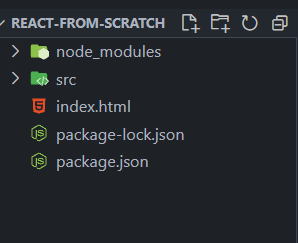
NOW put this code in you index.html file-
<!DOCTYPE html>
<html lang="en">
<head>
    <meta charset="UTF-8">
    <meta name="viewport" content="width=device-width, initial-scale=1.0">
    <title>My React App -from Scratch</title>
</head>
<body>
    <div id="root"></div>
    <script type="module" src="./src/index.js"></script>
</body>
</html>
And put this code in src>index.js file-
import React from 'react';
import ReactDOM from 'react-dom';

const App = () => {
    return (
        <div>
            <h1>Hello, React!</h1>
        </div>
    );
};

ReactDOM.render(<App />, document.getElementById('root'));
Now run this command to run your app locally-
npx parcel index.html
Congratulations you have successfully made a react app from scratch.